Free timesheet template in Excel
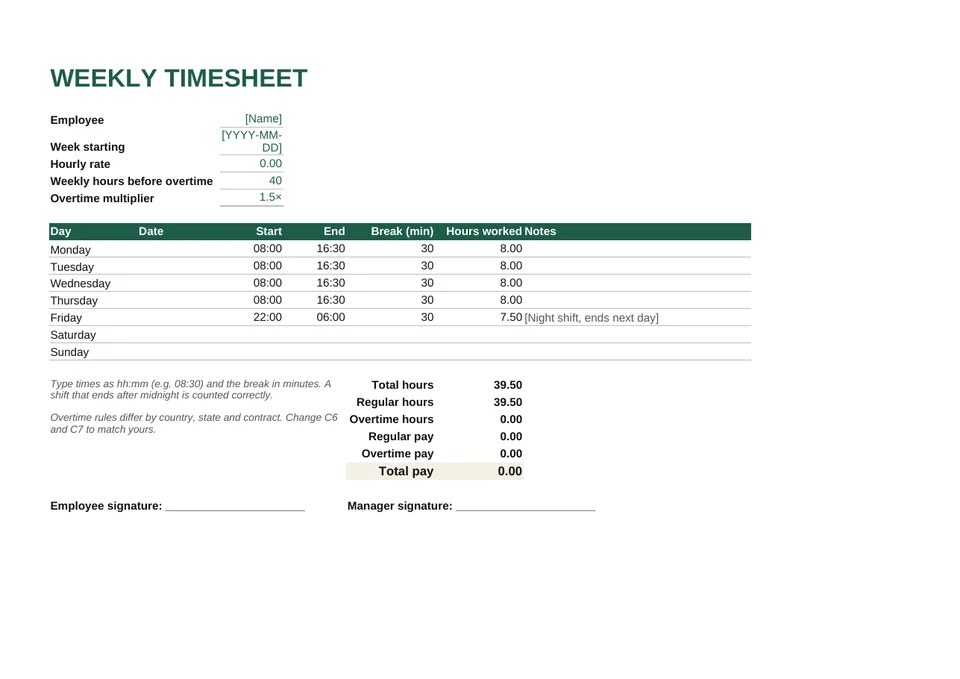
A weekly timesheet that works out the hours for you: type start, end and break, and the totals, overtime and pay fill in.
Also as: PDF, 63 KB
What’s included
- Excel (.xlsx) that works out hours per day, total, regular and overtime hours, and pay
- Clock times as hh:mm, breaks in minutes, and night shifts that end after midnight
- Overtime threshold and multiplier you can change
- Printable PDF with signature lines for employee and manager
- Opens in Excel, Google Sheets (upload to Drive, then Open with Google Sheets), LibreOffice and Numbers.
How to use the timesheet
- Enter the employee’s name, the week start date and the hourly rate at the top.
- For each day, type the start and end time (for example 08:00 and 16:30) and the break in minutes.
- The Hours worked column subtracts the break and works across midnight for night shifts.
- At the bottom you get total hours, regular hours, overtime hours and pay.
Overtime settings
The sheet counts hours above the weekly threshold as overtime. It is set to 40 hours and a 1.5× multiplier as a starting point; change both cells (C6 and C7) to match your contract or local law, because rules differ between countries, states and industries. Leave the hourly rate at 0 if you only need hours.
Printing and signing
Print the PDF version to fill in by hand, or print the Excel sheet after filling it in. There are lines for the employee’s and the manager’s signature.
Why a simple timesheet
Timesheets mostly go wrong in two places: breaks that are forgotten and times typed as decimals (“8.30” meaning half past eight, which is not 8.3 hours). This sheet takes times as clock times and breaks as minutes, so those two mistakes are harder to make.
Questions and answers
Does the timesheet calculate hours automatically?
Yes. Hours worked, totals, overtime and pay are formulas.
Does it handle night shifts?
Yes. If a shift ends after midnight, the hours are still counted correctly.
Can I use it in Google Sheets?
Yes. Upload it to Google Drive and open it with Google Sheets. It also works in LibreOffice and Numbers.
How do I change the overtime rule?
Change the weekly hours before overtime (cell C6) and the overtime multiplier (cell C7).
Is it free for businesses?
Yes, for any use, and no sign-up is needed.
Get 10 more templates
We’re making 10 more free templates. Leave your email and we’ll send them to you when they’re ready.
We store only your email address, the page you signed up on, the time and what you agreed to. We use it for this one thing and never share or sell it. To be removed, email info@freetemplates.app. Privacy